Prefill CMS Max Form Fields from a URL

CMS Max Help Center / Forms

Use field identifiers and query parameters to reduce repetitive typing without placing sensitive information in a URL.

Where query-string prefilling is enabled, a CMS Max form field can read a matching identifier from the page URL and use that value as its initial input.

Prefill CMS Max Form Fields from a URL CMS Max interface and guidance visual
CMS Max help-center reference visual. Verify labels and controls against the current administration interface.

Use field identifiers and query parameters to reduce repetitive typing without placing sensitive information in a URL.

Where query-string prefilling is enabled, a CMS Max form field can read a matching identifier from the page URL and use that value as its initial input.

Build the prefilled link

  1. 01
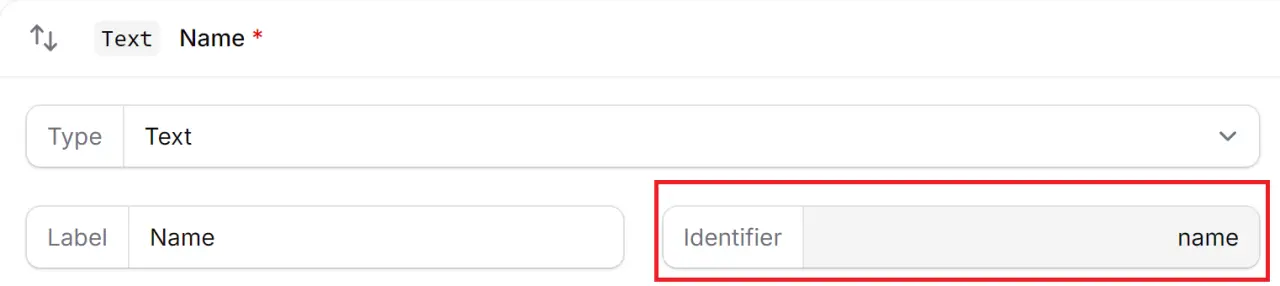
    Open the form fields. Find the field identifier used by the destination form.
  2. 02
    Add the query parameter. Append a question mark, the identifier, an equals sign, and a URL-encoded value.
  3. 03
    Test the result. For a field identifier of name, test
    https://example.com/contact?name=Sam
    on the published page.
  4. 04
    Confirm submission behavior. Make sure the visitor can review or change the prefilled value before submitting.

Use query strings carefully

  • Do not put passwords, payment details, health information, private customer data, or secrets in a URL.
  • URL-encode spaces and special characters.
  • Treat prefilled values as untrusted input and keep normal form validation enabled.
  • Test the exact field identifier after form migrations or schema changes.

Turn the guide into a verified website change.

CMS Max can help confirm scope, configuration, integration boundaries, and launch testing for the actual site.

Building Relationships with Web Developers and Marketing Agencies that want better results

The world's fastest and most SEO friendly website code.