Frequently Asked Questions about Global Trade Item Numbers
What is a GTIN number?
A GTIN (Global Trade Item Number) is a unique numerical identifier used internationally to identify products. It's the number that appears below the barcode on product packaging. GTINs help retailers, marketplaces, and search engines accurately identify and catalog products across the supply chain.
Where can I find the GTIN on my product?
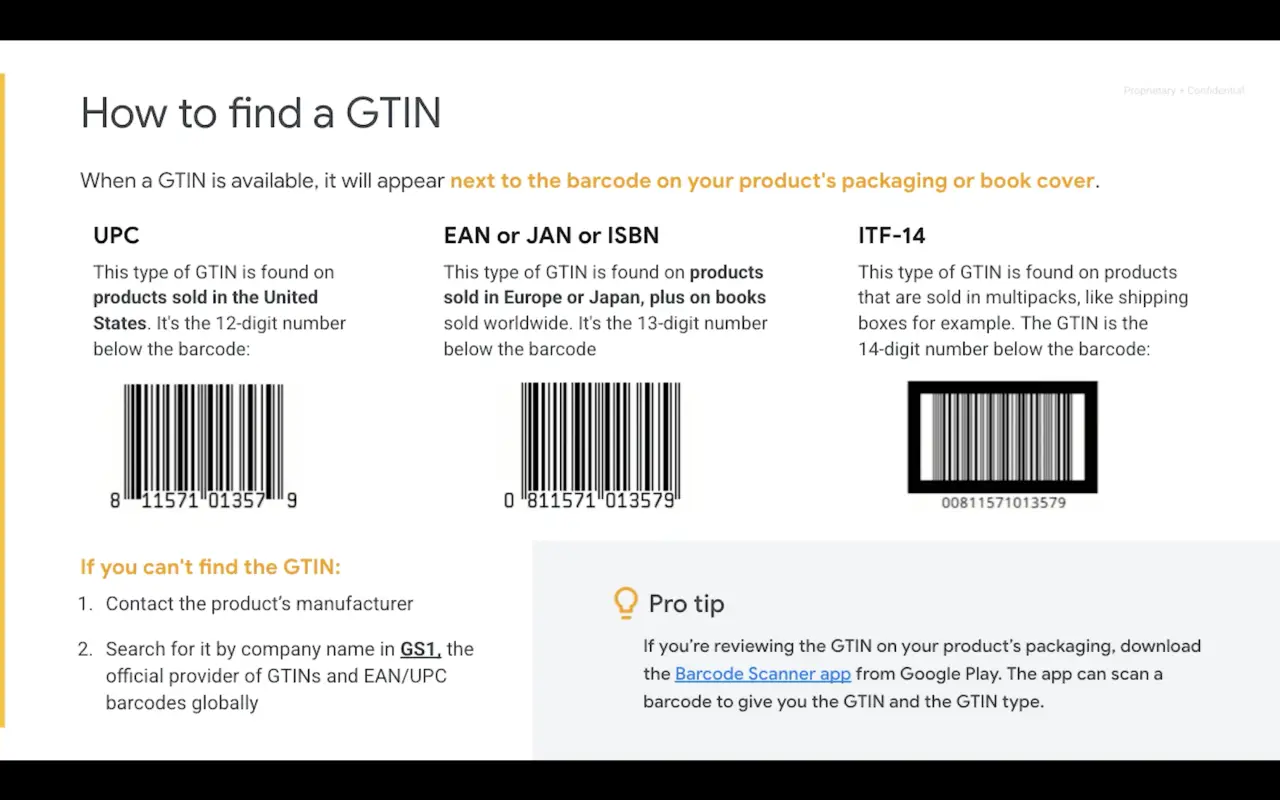
The GTIN is typically located on your product's packaging or book cover, directly below or near the barcode. Look for a series of numbers (8, 12, 13, or 14 digits) printed beneath the barcode's black and white lines. You can also use a barcode scanner app to quickly identify the GTIN.
What are the different types of GTIN formats?
There are four main GTIN formats:
- GTIN-8: 8 digits, used for smaller items
- GTIN-12/UPC: 12 digits, primarily used in North America
- GTIN-13/EAN: 13 digits, used in Europe, Japan, and worldwide for books
- GTIN-14/ITF-14: 14 digits, used for multipacks and shipping boxes
What if I can't find the GTIN on my product?
If you cannot locate the GTIN on your product packaging, contact your supplier or the product's manufacturer directly to request it. They should be able to provide the GTIN or MPN (Manufacturer Part Number) for the product. Keep in mind that not all products have GTINs, particularly handmade or custom items.
How do I get a GTIN for my own products?
To obtain GTINs for your products, visit the GS1 website (the official GTIN issuing organization). You can purchase a single GTIN for around $30, or get a Company Prefix if you need 10 or more GTINs. The Company Prefix allows you to generate multiple GTINs for your product line and requires an annual renewal fee.
Why are GTINs important for online selling?
GTINs are essential for online selling because many marketplaces like Amazon, Google Shopping, and eBay require them. They help improve product visibility, enable accurate product matching in search results, facilitate international sales, support price comparison tools, and enhance the overall customer shopping experience.
Do I need a different GTIN for each product variation?
Yes, each product variation (different color, size, or specifications) should have its own unique GTIN. This helps shopping platforms and search engines match customer queries with the exact product variant they're looking for. However, apparel is often an exception to this rule, as clothing items may share GTINs across sizes and colors.
Can I use a barcode scanner app to find GTINs?
Yes, using a barcode scanner app is an efficient way to identify GTINs. Google recommends the Barcode Scanner app from Google Play Store. These apps can scan a product's barcode, display the GTIN, identify the type of GTIN, and even verify product details through online databases.
What's the difference between GTIN, UPC, EAN, and ISBN?
GTIN is the umbrella term for all global trade item numbers. UPC (Universal Product Code) is a 12-digit GTIN used primarily in North America. EAN (European Article Number) is a 13-digit GTIN used in Europe and worldwide. ISBN (International Standard Book Number) is a 13-digit GTIN specifically for books. All of these are types of GTINs used in different regions or for specific products.
Are GTINs required for all products?
Not all products have or require GTINs. Handmade items, custom products, and vintage goods typically don't have GTINs. However, if a manufacturer has assigned a GTIN to a product, major marketplaces like Google Shopping and Amazon require you to include it. Products without GTINs when they should have them may receive lower visibility or priority in search results.