PayPal merchant configuration

Retrieve PayPal API Credentials for CMS Max

Connect the right merchant app to the right environment, then prove the complete payment lifecycle.

PayPal REST applications issue a Client ID and Secret for sandbox or live use. CMS Max stores the configured client secret as a protected setting, but a production launch still requires a completed PayPal implementation, controlled testing, provider approval, and merchant acceptance.

  • Sandbox before live
  • Client ID + Secret
  • Protected credentials
  • Lifecycle testing

Operating model

Credentials are one part of payment readiness.

Treat the app, environment, secret, checkout flow, provider account, and merchant operation as one controlled system.

01

Keep environments separate

Use sandbox credentials only with sandbox endpoints and live credentials only after controlled production approval.

02

Protect the Client Secret

Never place the secret in public HTML, client-side code, tickets, chat, or unapproved messages. Restrict access and document rotation.

03

Test the business lifecycle

Prove approval, cancellation, capture, duplicate prevention, notification handling, refund, support lookup, and reconciliation.

Current CMS Max capability

CMS Max has a protected PayPal settings boundary, not an automatic launch.

The current application includes PayPal enablement, Client ID, and encrypted Client Secret settings. Merchant-specific checkout behavior must still be verified in the accepted implementation.

01 / Capability

REST application identity

Use the merchant PayPal Developer Dashboard to create and own the application used by the website.

02 / Capability

Sandbox credentials

Exercise customer approval and server operations without creating real financial transactions.

03 / Capability

Live credentials

Switch only through controlled change after account readiness, implementation acceptance, and owner sign-off.

04 / Capability

Protected secret setting

CMS Max treats the PayPal Client Secret as encrypted configuration; operational access and rotation still matter.

05 / Capability

Checkout readiness review

Confirm the current tenant implementation creates, approves, captures, and records PayPal orders as scoped.

06 / Capability

Merchant operations

Map refunds, disputes, settlement, notifications, customer support, and accounting to named owners.

Step-by-step workflow

Create, configure, test, and accept the connection in sequence.

A saved Client ID and Secret do not prove that money, order state, and customer communication remain synchronized.

01

Create the app

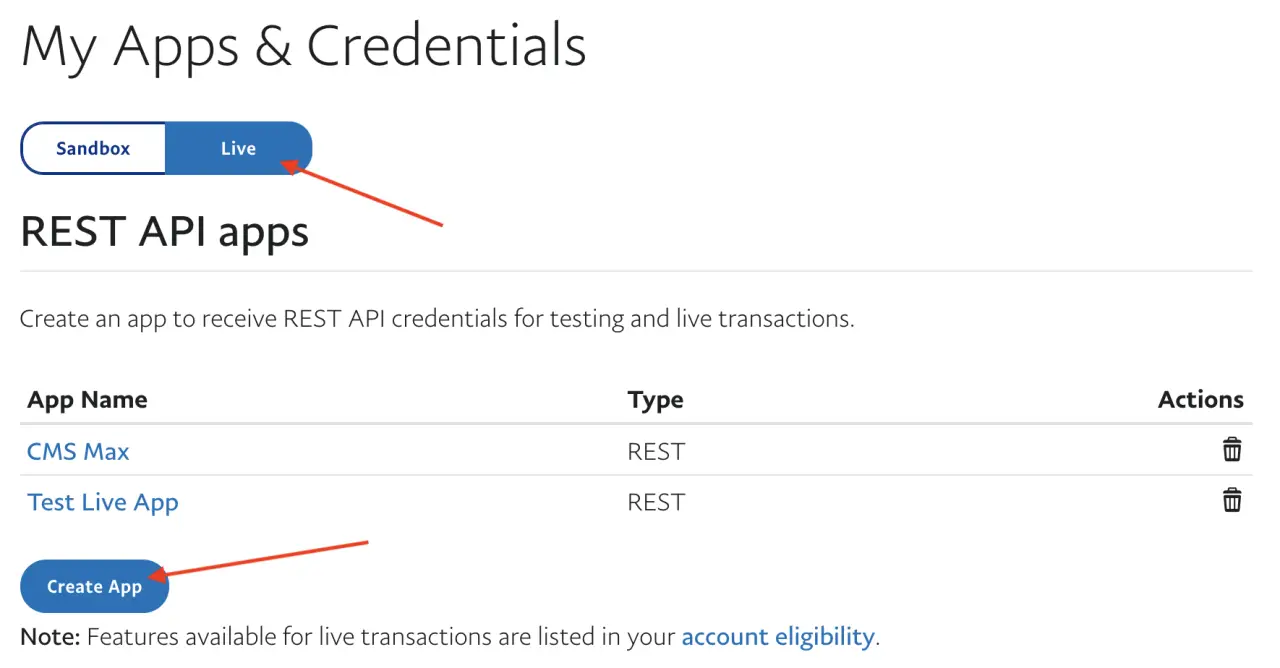
Sign in to the merchant PayPal Developer Dashboard and create a clearly named REST application.

02

Select environment

Start in Sandbox and identify the matching test business and buyer accounts.

03

Retrieve credentials

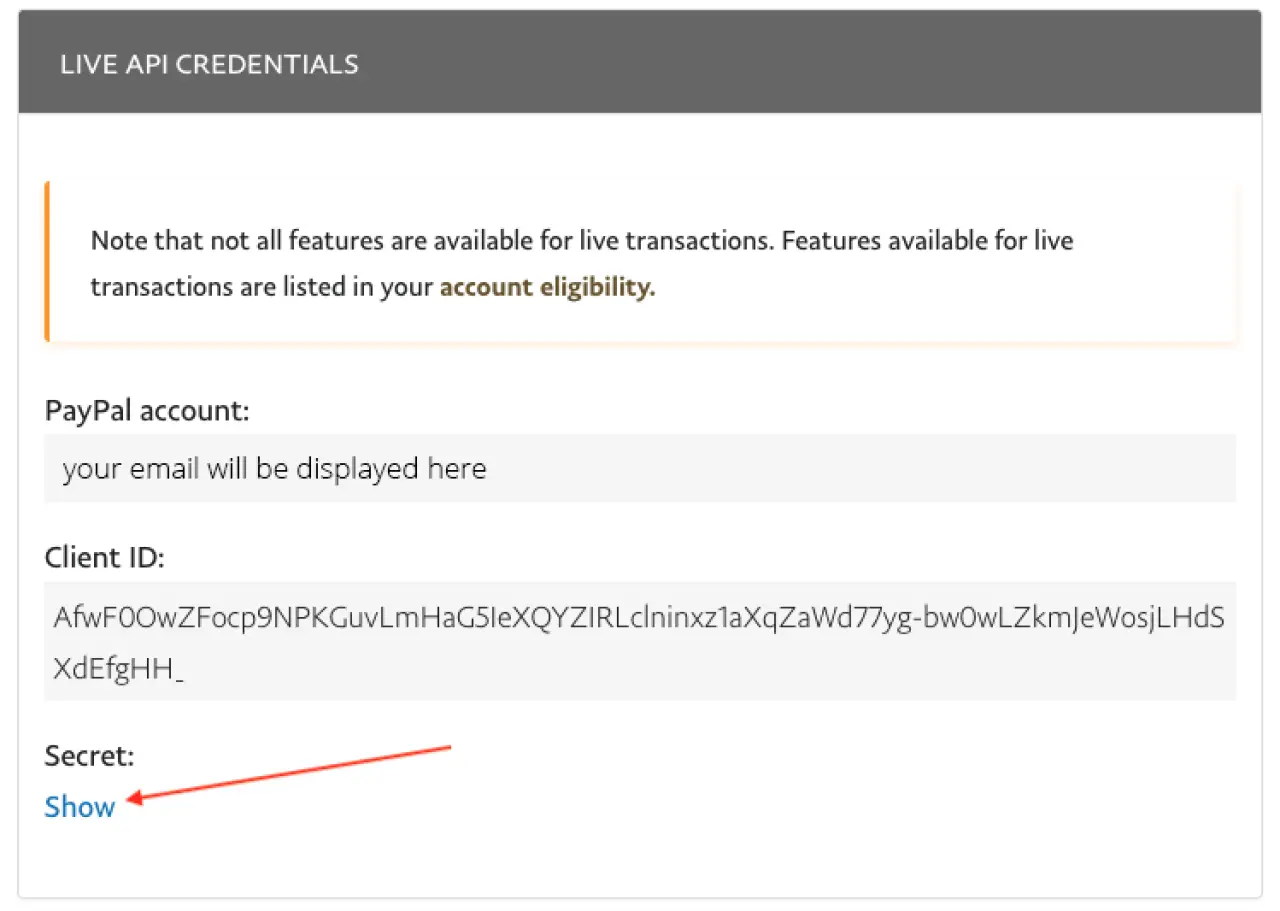
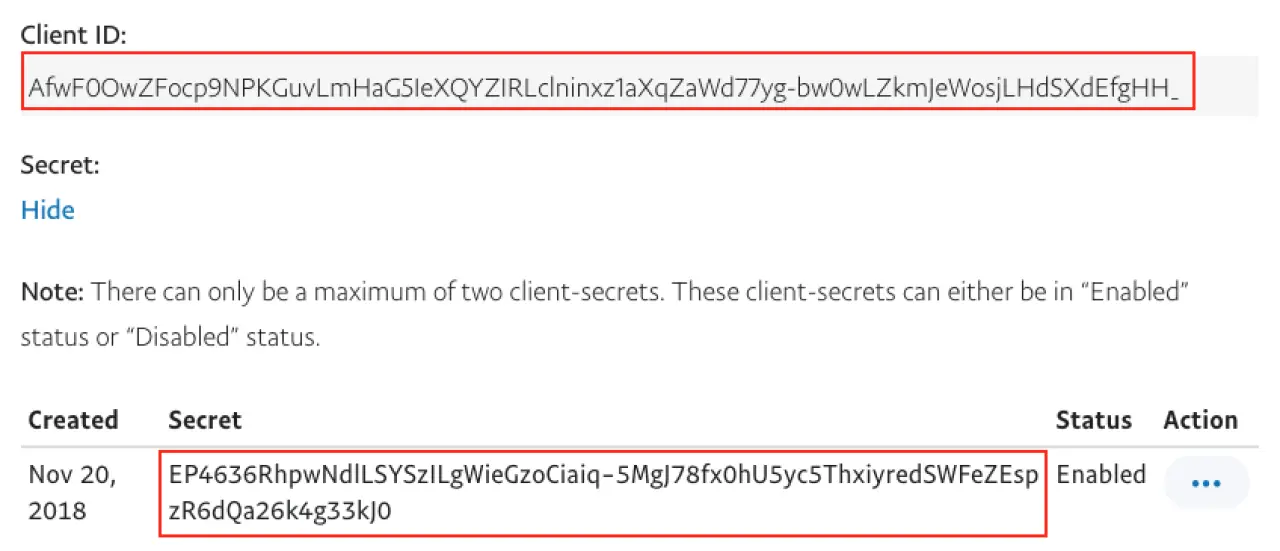
Copy the Client ID and reveal the Secret only for the approved secure configuration path.

04

Configure and test

Save matching credentials in CMS Max and exercise representative success and failure cases.

05

Move to live

Create or select the live app, change credentials under control, run a small live test, reverse it, and verify settlement.

Practical reference

Use the credential set that matches the transaction environment.

PayPal dashboard labels and product approval requirements can change. The merchant dashboard and current PayPal documentation are authoritative.

Client ID
Application identifier used by the approved PayPal integration and browser SDK configuration.
Client Secret
Private application credential used server-side to obtain access tokens. Never expose it publicly.
Sandbox
Test environment with test accounts and credentials; it does not prove live account or settlement readiness.
Live
Production environment for real customer transactions after merchant and implementation acceptance.
Rotation
Replace compromised or scheduled secrets, update the approved CMS Max setting, retest, and record the change.

Current references

Use live product and provider evidence.

Interfaces, policies, plans, services, pricing, and requirements can change. Verify the current CMS Max configuration and official provider sources during implementation.

How to Retrieve PayPal API Credentials FAQ

Resolve the practical questions before launch.

Turn each answer into configuration, representative testing, monitoring, ownership, and a documented recovery path.

Is the Client ID secret?

The Client ID identifies the app and may appear in approved client configuration. The Client Secret is private and must remain server-side and access-controlled.

Can sandbox credentials process real money?

No. Sandbox simulates PayPal behavior with test accounts. Production uses separate live credentials and endpoints.

Does saving credentials complete the integration?

No. Confirm the accepted CMS Max implementation, customer approval, server processing, final order state, notifications, refunds, and reconciliation.

Can PayPal be used in Maxforms today?

The current CMS Max form payment model supports the configured card provider family and Paya ACH. Do not promise PayPal for forms without a separately completed implementation.

How should a secret be shared with CMS Max?

Use the approved secure onboarding or credential-management path. Do not send it in normal email, public forms, content, or chat.

Build for real operations

Launch PayPal with transaction evidence, not credentials alone.

CMS Max can help map the merchant app, checkout implementation, testing, support, refund, and reconciliation requirements.

Building Relationships with Web Developers and Marketing Agencies that want better results

The world's fastest and most SEO friendly website code.