

Seamless ACH Payment Integration: CMS Max and Paya Transform eCommerce
In the rapidly evolving digital economy, business owners are constantly seeking streamlined solutions to enhance their e-commerce platforms. The recent integration of CMS Max with Paya presents a groundbreaking development, especially for those looking to offer a more versatile payment system to their customers. This collaboration enables seamless ACH (Automated Clearing House) payment acceptance directly on business websites, marking a significant leap forward in online transaction efficiency.
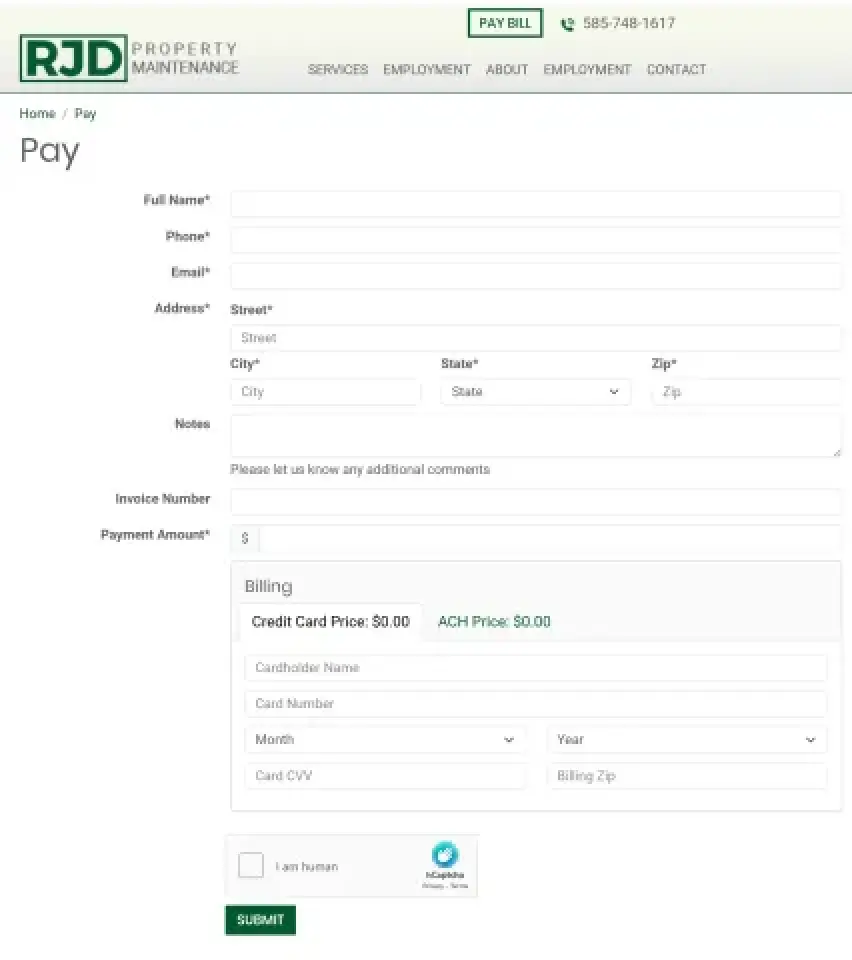
We build a web page for your customers to pay their bill online!
- Fully branded web page to your company colors
- Secure and certified direct integration to Paya
- Customizable form fields
- Add fees or offer discounts by paying with ACH
- 99.9999% uptime ensure your revenue is never at risk
Fees
- $1.25 per transaction fee
- .25 cents per batch
- $10/mo
- Transactions $10,000 and over will incur an additional .6% discount rate
- Transactions below $10,000 will have no other additional fees
- No annual fee
- $2 return fee and $2 reversal fee
- $1.25 fee for any voids or refunds
- Swiftsettle: .30 cents per transaction extra (faster processing time)
- Swiftsettle: .75 cents return fee
(Click thumbnail to enlarge)
Why Choose CMS Max for your Paya Integration?
- Effortless Form Building for ACH Payments: With the CMS Max and Paya integration, businesses can now easily create custom forms on their websites to accept ACH payments. This simplifies the process of setting up direct bank transfers, making it accessible even to those with minimal technical expertise.
- Enhanced Customer Experience: By offering ACH payment options, businesses can provide their customers with a more flexible and convenient payment method. This not only improves the overall shopping experience but also helps in increasing conversion rates.
- Secure Transactions: The integration ensures high levels of security for all transactions. Paya's robust security measures are designed to protect sensitive financial information, giving both businesses and their customers peace of mind.
- Streamlined Financial Management: With ACH payments, businesses can benefit from lower transaction fees compared to traditional credit card payments. This integration also allows for more efficient management of recurring payments, making it ideal for subscription-based services.
- Quick and Easy Implementation: The seamless integration process between CMS Max and Paya means businesses can start accepting ACH payments in no time. This quick setup ensures minimal disruption to existing operations, allowing business owners to focus on what matters most – growing their business.
This innovative partnership between CMS Max and Paya is set to redefine how e-commerce platforms handle payments, offering a more efficient, secure, and user-friendly solution for both businesses and their customers.
FAQ's
They work the same as a credit card refund, except a refund will happen after the batch has completed for that day, which is after 12:00:01 AM Mountain Time
Same way as refund, however, you must process a void before 11:59:00 PM Mountain Time
Yes! You can view our certification here.
Merchant Support: 1-800-261-0240, Option 1
eft-customersupport@nuvei.com
Other Periodic Fees = Network Compliance Fee (could include (If applicable) annual fee, Invalid tin and termination fee.)
Other Transaction Fees = Returns (could also refer to (If applicable) reversal fees, chargeback fee, and premium fees)
Conversion Fees: This is the per Transaction fee with a successful approval to process
Verification Fees: These are transaction fees associated with an attempt to process, hitting our verification servers, but did not process to conversion like above either due to decline or transaction ran as a verification only type transaction.
Batch Fees: Each time merchant batches – once per day.
Resubmission Fees: If they had transactions that were returned for NSF, we would submit them again. Those fees would be listed here.
Discount Fees - The Discount Rate you are charging the merchant
- Merchant Batch Results – This report is used on a merchant or per location level in conjunction with the batch report that prints when a terminal "batches out" to send the transactions for processing. This report includes the dollar amount of a credit per batch. This is an overall and up to date view of a given batch on the date the report generates.
- Merchant Bank Statement – This report is used in conjunction with a physical bank statement to reconcile the daily credits, fees, and debits for the amount that was sent to the business bank account per a specific date range. This can be used on a merchant or per location level.
- Merchant Rejections – View transactions which rejected/ immediately declined at the time of authorization
- Merchant Transactions – View unsuccessful/returned consumer debits. This report is used on a merchant or per location level to view the individual debit transactions within a specified date range. This report is also updated as changes/status updates happen within a consumer debit transaction.
- Merchant Uncollected Checks – This report is used to view the check transactions that are combined to make a merchant debit. The report is used by the date or date range based on the end of cycle (EOC) date. This correlates to the Merchant Bank Statement to the "Debit" column. If on a guarantee program, contains only the check transactions which were debited back to merchant bank account.
- Merchant Transactions by Batch – View individual transactions and current check and funding status within a specific Batch ID. Check images can be viewed if an image was uploaded.
- Merchant Returns List – View list of Returned transactions. This report is also used to track the collection progress of a guaranteed consumer debit in the various stages of collections.
- Merchant Transactions Received – View individual transactions and view the current funding status - sorted by the date Paya received the transactions. This report is used on a merchant or per location level to view the list of individual debit transactions only on the date that the transactions are received.
- Merchant Rejections Received – View transactions which rejected/ immediately declined at the time of authorization - sorted by the date Paya received the transactions.
- Merchant Returns – View transactions which have been returned. Report is updated daily.
- Merchant Deposit Detail – This report shows the individual transactions that make up the daily deposits. This does not include fees.
- Merchant Daily Returns Resolution – View transaction returns daily.
- Web Entered Transactions Before Source Doc – see transactions on a gateway before it creates a source document in our system (before batch/processed and can be voided prior to batch)
Paya ACH transactions can take 2–5 days to settle. Here are some other things to know about ACH payments:
Processing
ACH transfers are processed in batches throughout the day, and are not instantaneous.
Receiving bank
The receiving bank may hold the funds before releasing them to ensure the originating bank has enough funds.
Speed
ACH transfers are slower than wire transfers, which typically process within the same day or even within minutes.
Same-day ACH
Same-day ACH is available, but typically requires an additional fee.
Batch settlements
For non-holiday examples, if a batch is settled on Monday night, funds are processed by the acquiring bank the following Tuesday.
View a list of all things not allowed by clicking here.
