Treat shipping as a system
Origin, destination, zones, products, packing, rates, checkout, orders, labels, tracking, returns, support, and billing need one documented operating model.
Multi-carrier shipping platform
Run multi-carrier checkout and fulfillment from one connected commerce workflow.
The CMS Max Shippo plugin connects checkout rating, parcel data, address validation, carrier and service filters, label creation, tracking, refunds, and API visibility. Choose a CMS Max managed account path or connect your own Shippo credentials, then operate the full shipping lifecycle with clear ownership.

Shipping architecture
Connect account access to accurate catalog data, parcel preparation, checkout policy, fulfillment ownership, customer communication, and financial reconciliation.
Origin, destination, zones, products, packing, rates, checkout, orders, labels, tracking, returns, support, and billing need one documented operating model.
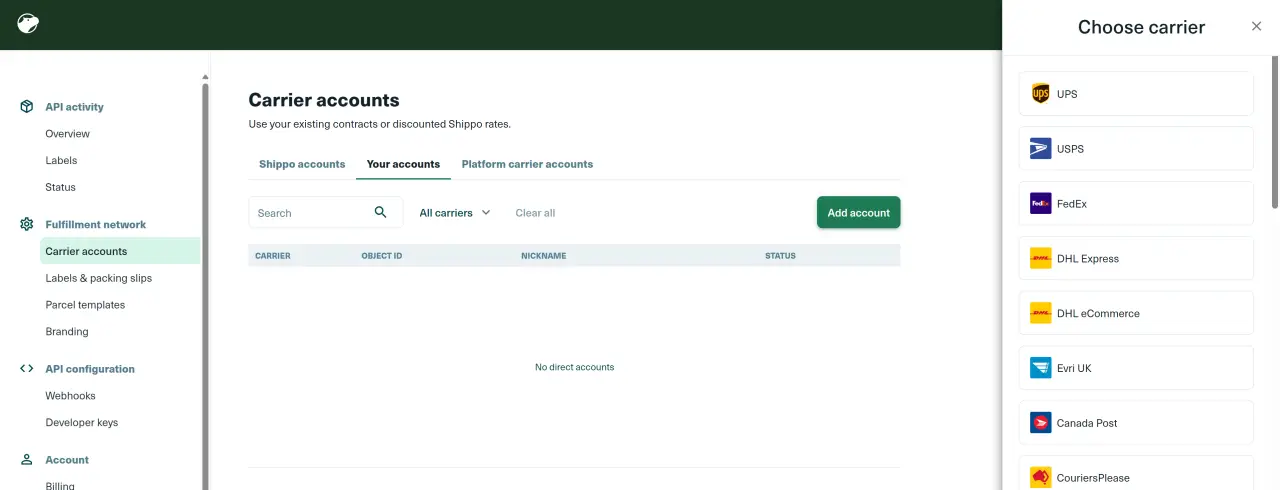
Connect the right carrier accounts, then limit carriers and service levels to options the business can actually prepare, tender, support, and reconcile.
Use representative tests, API logs, a deliberate fallback rate, alerting, and a manual recovery process so a provider issue does not become a silent checkout failure.
CMS Max shipping capabilities
Availability depends on active plugins, account mode, connected and eligible carrier services, current provider support, accurate data, origin, destination, parcel, and tenant configuration.
Use the CMS Max Enterprise managed-account path where available or connect a custom Shippo API key for an account the merchant controls directly.
CMS Max sends the ship-from and ship-to addresses plus packed parcel data to Shippo and combines eligible returned rates with the store shipping configuration.
The integration supports Shippo address validation so checkout can identify or suggest corrections for supported address issues before fulfillment.
Choose allowed carriers and allowed service levels, leaving a filter empty only when all currently connected and eligible options should be considered.
Purchase eligible labels and use the configured PDF, PDF 4x6, PNG, or ZPLII output that matches the team and printer workflow.
Support carrier tracking data, eligible unused-label refund requests, administrator API logs, and a configured flat checkout fallback for qualifying service failures.
Order-to-delivery flow
Each stage needs valid inputs, observable results, an exception path, and a named owner.
Set account mode, origin, carriers, services, and formats.
Check customer address and shipping eligibility.
Convert shippable products into parcel requests.
Return eligible carrier choices to checkout.
Buy labels, track, handle exceptions, and reconcile.
Implementation sequence
Move from account ownership to checkout and warehouse testing before making a shipping promise public.
Document products, parcel types, destinations, service promises, carrier relationships, negotiated rates, label printers, returns, and support ownership.
Choose the CMS Max Enterprise managed option when provisioned or use a merchant-owned Shippo account and protected API key.
Provision the managed account or add supported carrier accounts in Shippo, complete carrier-specific terms or verification, and confirm billing ownership.
Maintain the store origin, product weights and dimensions, zones, methods, carrier filters, service filters, label format, and a deliberate fallback rate.
Test address correction, rate results, mixed carts, multiple parcels, filters, fallback behavior, label purchase, print output, tracking, and an eligible label refund.
Review API errors, carrier invoices, shipping-margin variance, delivery exceptions, fallback usage, refunds, customer contacts, and configuration changes.
Operational ownership
CMS Max, Shippo, the carrier, and the merchant each own different parts of the workflow. Clear boundaries make support and recovery faster.
Documentation and related resources
Provider interfaces, terms, services, formats, and regional availability can change. Use official documentation and production tests during implementation.
Shipping integration FAQ
Turn each answer into configured rules, representative tests, monitoring, and written ownership.
It connects CMS Max to Shippo for supported multi-carrier rate requests, address validation, carrier and service filtering, labels, tracking data, eligible refunds, API logs, and checkout fallback handling.
Not always. CMS Max supports an Enterprise managed-account path when provisioned and a custom-account path for merchants who want to use their own Shippo credentials and carrier relationships.
Carrier availability depends on Shippo support, the account mode, connected carrier accounts, region, origin, destination, parcel, services, terms, and verification. CMS Max can filter the connected carriers and service levels offered at checkout.
Maintain accurate shipping eligibility, weight, dimensions, quantity, origin, destination, and applicable package rules. Incomplete or inaccurate inputs can produce unavailable or misleading quotes and later carrier adjustments.
The current CMS Max setting supports PDF, PDF 4x6, PNG, and ZPLII. Actual carrier and service support should be confirmed with a representative production test.
CMS Max can apply a configured flat fallback rate for qualifying Shippo API failures. It is a continuity tool, not a live quote, so the merchant should set it carefully and monitor every use.
Ship with confidence
Bring your carrier accounts, package profiles, destinations, service promises, label workflow, exception policy, and cost targets. CMS Max will help map the supported implementation.
The world's fastest and most SEO friendly website code.