DoorDash
Offer on-demand local delivery through DoorDash directly from your online store.
Overview
The DoorDash plugin connects your online store with DoorDash's local delivery network, giving your customers the option to have orders delivered right to their door. Delivery is available across all 50 states and Puerto Rico, with no need to manage your own drivers.

How Delivery Pricing Works
Delivery is priced based on distance from your store to the customer:
- A flat fee of $7.50 covers deliveries within 5 miles
- Beyond 5 miles, an additional $0.75 is charged per mile
- Maximum delivery radius is 15 miles — orders beyond this distance cannot be fulfilled via DoorDash
Distance is calculated precisely (to the nearest meter), so customers only pay for the exact distance of their delivery.
Setting Up Pickup Timing
You can configure how much time DoorDash allows you to prepare an order before a driver arrives for pickup. A common setting is 15 minutes, which gives your team enough time to pick and pack the order before the driver shows up.
To adjust pickup timing:
- Go to Plugins in your admin panel
- Open the DoorDash plugin settings
- Choose whether drivers should be dispatched immediately or after a delay
- If using a delay, enter the number of minutes to wait before dispatching
Supported Product Types
DoorDash supports delivery of many product categories, including food items, apparel, shoes, and general retail goods. Each product type you sell can be designated in the plugin settings to ensure compliance with DoorDash's delivery policies.
What Cannot Be Delivered
DoorDash prohibits delivery of certain items. The following cannot be sent through DoorDash:
- Hazardous materials, weapons, explosives, and ammunition
- Illegal items or stolen goods
- Alcohol, tobacco, vaping products, and certain medications (unless a separate agreement is in place with DoorDash)
- Recreational drugs or related paraphernalia
- Raw meats, shellfish, and products from endangered species
- Cash, gift cards, and financial instruments
- Items weighing over 50 lbs, or food prepared tableside
DoorDash also reserves the right to decline any delivery they consider unsafe or inappropriate.
Tracking Deliveries
Once a delivery is dispatched, your admin panel will show real-time status updates as the driver moves through the delivery process — from confirmation, to pickup, to drop-off. When a delivery is marked as dropped off, the order is automatically marked as fulfilled.
DoorDash orders are identified by the Fulfillment method column on eCommerce > Orders, and the Fulfillment Method filter narrows the list to them:
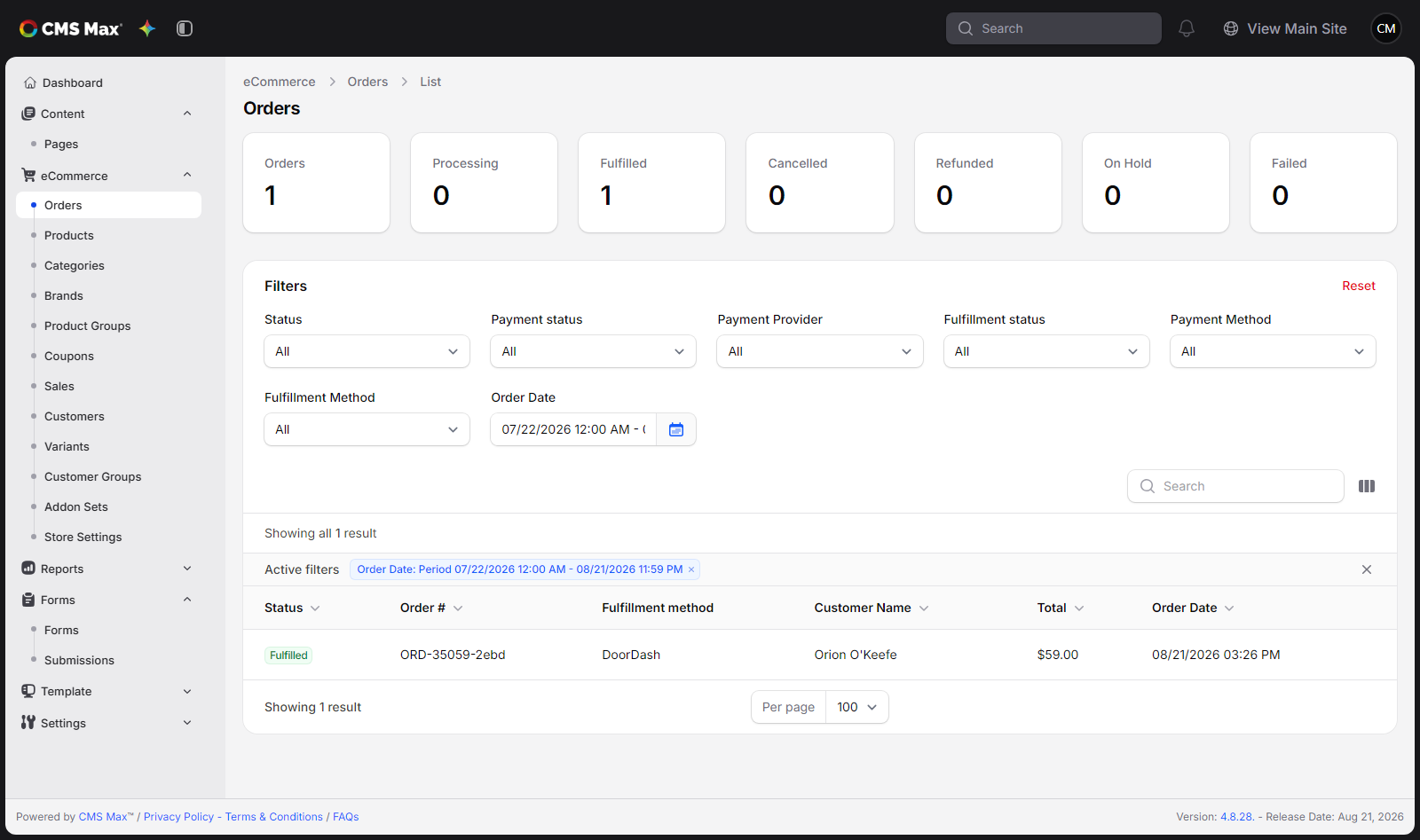
ACH orders are not dispatched to DoorDash until the bank payment clears. If an order is cancelled or leaves Processing while the request is queued, CMS Max skips the driver request.
Cancelling a Delivery
Deliveries can be cancelled before a driver has picked up the order. Once an order has been picked up, cancellation is no longer possible.