TaxJar
A tax compliance solution that automates sales tax calculations, reporting, and filing for your business.
Overview
TaxJar is the sales-tax engine CMS Max uses under the hood. Your store sends the cart and shipping destination to TaxJar; TaxJar returns the correct rate down to the city/county level. You don't maintain tax tables.
You have two options: use the free tier (shared CMS Max TaxJar account, up to 100 orders/month in the tax API) or connect your own TaxJar account for unlimited usage and advanced features like AutoFile.
Most stores should start on the free tier. Switch to your own account only if you exceed the limit or want TaxJar-specific features.
What TaxJar handles for you
- Accurate sales tax rates down to city and county level — no manual tax tables to maintain
- Real-time calculations at checkout, with API response times under 75 milliseconds
- Tax applied based on the correct fulfillment location (shipping address, pickup location, or delivery address) — not the billing address
- Fallback to per-state average rates if TaxJar is temporarily unreachable, so customers always see a tax amount
- A record of each transaction in TaxJar for reporting purposes
Configuring TaxJar
For the tax-collection setup that applies regardless of account type (tax locations, product tax codes), see the Sales Tax guide.
This page covers TaxJar plugin-specific settings.
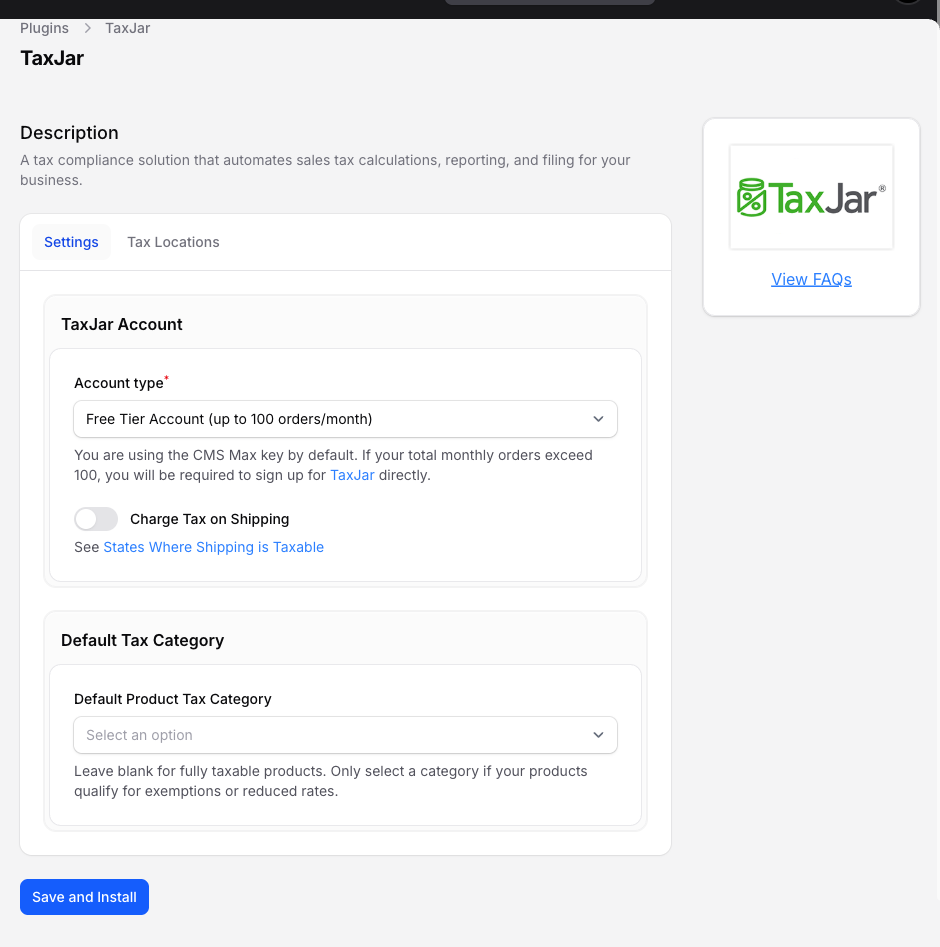
- Navigate to Settings > Plugins > TaxJar > Settings.
- Choose your Account type:
- Free Tier Account (up to 100 orders/month) — uses the CMS Max-provided TaxJar key; no setup.
- Paid-tier option — enter your own TaxJar API key. Unlimited volume on your TaxJar plan.
- Optionally toggle Charge Tax on Shipping (state-law dependent — see the linked states list on the form).
- Optionally set a Default Product Tax Category (applies to all products that don't have their own tax code).
- Click Save and Install.
Free Tier vs Own Account
| Free (CMS Max account) | Own Account | |
|---|---|---|
| Monthly orders (across the whole TaxJar API) | Up to 100 | Limited only by your TaxJar plan |
| API key management | None — handled for you | You manage your TaxJar API key |
| TaxJar dashboard access | No | Yes — your TaxJar account |
| AutoFile | Not available | Available if your TaxJar plan includes it |
| Transaction IDs in TaxJar | Prefixed with your tenant ID | Clean (just the order number) |
| Best for | Stores under 100 orders/month, or stores that don't need TaxJar-specific features | High-volume stores, stores wanting AutoFile or detailed TaxJar reporting |
How to switch from free to own
- Sign up at taxjar.com and get an API key.
- Navigate to Settings > Plugins > TaxJar > Settings.
- Change Account Type to Own Account.
- Paste the API key in API Key.
- Click Save.
Existing orders stay in the CMS Max shared TaxJar account. New orders record against your account from the save point forward.
AutoFile
AutoFile lets TaxJar automatically prepare and submit your sales-tax returns to each state you collect in. It requires the Own Account tier and an active AutoFile subscription on your TaxJar plan. See the AutoFile guide for full details.
How Sales Tax is Calculated
Sales tax is always based on where your customer receives their goods — not their billing address. See How Sales Tax is Calculated for a full breakdown by fulfillment method.
Troubleshooting
"Your store is missing TaxJar" dashboard warning
You have tax locations configured but the TaxJar plugin isn't active. Click Fix It, choose the appropriate account type on the TaxJar settings page, then save to install the plugin. If TaxJar was previously installed and deactivated, use Activate at the top of the page instead.
"TaxJar is installed, but its account type or API key is invalid" dashboard warning
TaxJar is active but cannot obtain the API key required by the selected account type. Click Fix It, choose either the shared Free Tier Account or Your Own Account with a valid API key, and save the settings.
"Your store is setup to collect no tax on sales" dashboard warning
You have no tax locations configured. Add at least one under eCommerce > Store Settings > Store Information > Tax — otherwise no tax will ever be collected, even for customers in your state.
Tax looks wrong for a single order
Open the order in the admin and check the Tax Breakdown panel. It shows what TaxJar returned for each jurisdiction (state, county, city, special district). If those numbers look wrong, the destination address is probably the cause — verify city/ZIP match.
Tax is $0 but I expected it
Three common causes:
- Destination state isn't in your Tax Locations.
- Destination is a non-taxing state (AK, DE, MT, NH, OR).
- Product has a tax-exempt tax code overriding the default.
TaxJar API outage
If TaxJar is unreachable, CMS Max falls back to a per-state average rate. Customers still see tax; once TaxJar is back up, new calculations use live rates again.